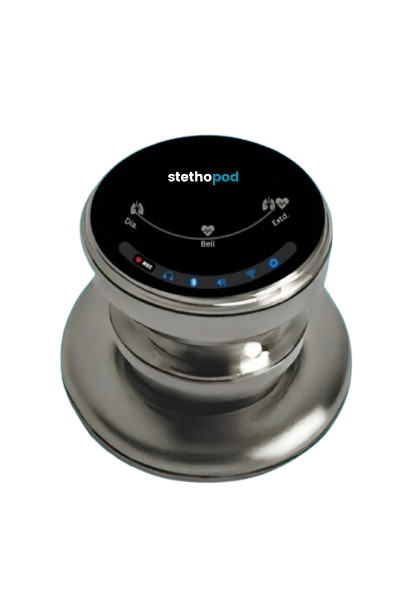
Electronic stethoscope for teaching and training · Made in India

stethopod: hear, record and share body sounds for teaching

  • Wired headphonesAny 3.5 mm earphones, always on.
  • Wireless earbudsBluetooth LE Audio, no tubes.
  • BroadcastAuracast to a whole class at once.
  • A class miles awayLive through the Stethopod app.

Multiple microphones, on-device noise cancellation, recording with a spoken note, a round touch screen, Auracast broadcast to a whole class and the Stethopod app. No subscription.

For education, training and demonstration. Stethopod is not a medical device: it presents sound only and does not measure, diagnose or monitor any condition. It must not be used to make clinical decisions.

Stethopod digital stethoscope with round touch screenStethopod listening screen

What it does

Clear sound, engineered rather than promised

48 kHz capture from multiple MEMS microphones, 40 dB of clean gain, and on-device processing that filters to the mode you chose and cancels the room.

  • Three listening modes

    Bell 40–150 Hz for low-pitched sounds, Diaphragm 90–1000 Hz for breath sounds, Extended 10–1200 Hz for the full chestpiece range. One tap on the device or in the app.

  • Multiple-microphone noise cancellation

    Extra microphones listen to the room and the DSP subtracts them from the chestpiece signal, so a noisy classroom or skills lab does not drown the sound.

  • Earbuds, not tubes

    Bluetooth LE Audio streams to your own earbuds. Wired 3.5 mm earphones work too, with the volume you set on the rim.

  • Auracast for teaching

    Broadcast the sound to every Auracast receiver in the room. A whole class hears the same sound at the same time, with no pairing.

  • Record and annotate

    Tap REC, say a name or number for the entry, tap MIC for the chestpiece clip, tap once more to save. Numbered WAV files on the device and in the app.

  • Live to anyone, anywhere

    The Stethopod app shares the sound in real time with someone anywhere in the world, with a six-digit code. Nothing is stored on our servers.

  • A screen you can use with gloves

    1.28 inch round touch screen. Mode, volume, output and recording are one gesture each, with a dark and a light theme.

  • All-day battery, USB-C

    Charge from any USB-C charger. A fuel gauge shows the real percentage on the screen and in the app.

  • No subscription

    The device, the app and live sharing work without a subscription. There is nothing to renew.

The screen

Every function is one gesture

A 1.28 inch round touch screen. Modes on the top arc, volume on the rim, four actions on the bottom bar. Dark theme for a dim room, light theme for daylight; both remembered.

  • Stethopod Boot screen, dark theme

    01Boot

    Firmware version on the boot screen, readable without a cable.

  • Stethopod Listening screen, dark theme

    02Listening

    Bell, Diaphragm or Extended on the top arc. Nothing moves while you listen.

  • Stethopod Volume screen, dark theme

    03Volume

    Drag along the rim. Eight steps, stops at the top, never wraps back to zero.

  • Stethopod Muted screen, dark theme

    04Muted

    The mode word stays, so you know the filter has not changed.

  • Stethopod Output screen, dark theme

    05Output

    Wired always on. Bluetooth on or off. Pair LE Audio earbuds.

  • Stethopod Pairing screen, dark theme

    06Pairing

    Visible for 60 seconds; Auracast receivers can join without pairing.

  • Stethopod Display screen, dark theme

    07Display

    Five brightness steps and a dark or light theme, remembered across power cycles.

  • Stethopod Help screen, dark theme

    08Help

    A QR code opens this manual on your phone, with the serial number for support.

  • Stethopod Noise cancel screen, dark theme

    09Noise cancel

    The extra microphones subtract the room from the chestpiece sound.

  • Stethopod Phone link screen, dark theme

    10Phone link

    The app shares the sound live with someone anywhere, using a six-digit code.

  • Stethopod Recording screen, dark theme

    11Recording

    Tap REC. Mode, volume and noise cancel keep working while it records.

  • Stethopod Voice note screen, dark theme

    12Voice note

    Say a name or number first, on the room mic. Saved with the clip as one entry.

  • Stethopod Saved screen, dark theme

    13Saved

    Both clips kept together on the device and in the app.

  • Stethopod Charging screen, dark theme

    14Charging

    USB-C, any 5 V charger, about two hours to full.

  • Stethopod Alert screen, dark theme

    15Alert

    Amber only when something needs you: cable, battery or card.

Use cases

From a lecture hall to a skills lab to a class in another city

Teaching with Auracast

Teaching auscultation has always meant one student on the earpieces at a time. With Auracast broadcast, every student with LE Audio earbuds hears the same sound at once, in a lecture hall or a demonstration room.

  • One device, unlimited receivers
  • No pairing: receivers join the broadcast
  • Works alongside the wired earpieces of the teacher

Skills labs and simulation

Students practise placing the chestpiece on each other or on a training manikin, switching Bell, Diaphragm and Extended to hear how the filters change the sound, with noise reduction for a busy lab.

  • Three filter modes, one tap each
  • Noise reduction on or off
  • A round screen that works with gloves

Live demonstration at a distance

An instructor shares the sound live from the Stethopod app; students in another room or another city listen on their phones with a six-digit code.

  • Six-digit session code
  • Sound shared in real time, never stored on our servers
  • Listeners can be blocked or reported

A personal sound library

Record numbered clips with a spoken note and keep them on the phone for revision, or share them with a class through any app on the phone.

  • WAV files you own, playable anywhere
  • Voice note saved with each clip
  • Nothing leaves the phone unless you send it

The app

Everything the screen does, on your phone too

The Stethopod app for Android and iOS connects over Bluetooth Low Energy, shows the live waveform, and controls mode, volume, output, noise cancellation and the device screen. Change something on the device and the app follows, and the other way round.

  • Go Live: a six-digit code lets a colleague listen in real time anywhere. Invite saved contacts by Stethopod ID.
  • Record a clip and a spoken note on the phone; play, share or delete from the Recordings screen.
  • Battery level, device theme and brightness, and the searchable user manual built in.
  • Sign in with email, Google or Apple. Delete your account and data from the app at any time.

App Store and Google Play listings open with the first production batch.

Stethopod Phone link screenStethopod Recording screenStethopod Saved screen

Specifications

Built around sound

Both microphones are captured at 48 kHz. The processing that filters to the chosen mode, cancels the room and drives the earphones, earbuds and the app all happens on the device.

Audio
48 kHz, 16-bit, multiple MEMS microphones
Modes
Bell · Diaphragm · Extended
Noise cancellation
Multiple-microphone subtraction, adaptive, on-device DSP
Outputs
3.5 mm wired · Bluetooth LE Audio (unicast) · Auracast broadcast
Phone link
Bluetooth Low Energy, 8 kHz mono stream to the Stethopod app (Android and iOS)
Screen
1.28 inch round IPS, 240 × 240, capacitive touch, dark and light theme
Recording
On device, 8 kHz 16-bit WAV, numbered entries with a voice note
Battery
Rechargeable lithium cell with fuel gauge, USB-C charging
Buttons
Two side buttons: mode / sleep, mute
Made in
India

Questions

Frequently asked

Is Stethopod a medical device?

No. Stethopod is an electronic stethoscope for education, training and demonstration. It amplifies, filters, records and shares sound. It is not a medical device: it does not measure, analyse, diagnose or monitor any condition, and it must not be used to make clinical decisions.

Which earbuds work with it?

Any earbuds that support Bluetooth LE Audio. Auracast-capable earbuds can also join the broadcast without pairing. Ordinary wired 3.5 mm earphones work in the jack.

How does remote listening work?

Connect the Stethopod app to the device, tap Go Live and share the six-digit code. The other person opens Listen Remotely in the app and enters the code. The sound is relayed in real time and is not stored on our servers.

Where are recordings kept?

Recordings made on the device stay on the device as WAV files. Recordings made in the app stay on the phone until you share or delete them. We never receive them.

Does it need a subscription?

No. The device, the app and live sharing work without a subscription, with nothing to renew.

What is the difference between Bell, Diaphragm and Extended?

They are filter modes named after the chestpiece sides. Bell passes 40–150 Hz, Diaphragm 90–1000 Hz, Extended 10–1200 Hz. Change them on the top arc of the screen, with the side button, or in the app.

Can several students listen at once?

Yes. Auracast broadcast sends the sound to every Auracast receiver in range at the same time, with no pairing. That is how the teaching use case works.

How do I clean it?

Wipe the chestpiece and housing with a cloth dampened with 70 % isopropyl alcohol between uses. Do not immerse it or spray liquid into the jack or the USB-C port.

How do I buy one?

Use the form on this page or email info@slimiot.com with the number of units and where they will be used. We reply with the price and the delivery time within two working days.

Buy

Buy Stethopod

Stethopod is a SlimIoT product, designed and built by SlimIoT Technologies Private Limited in India. Tell us how many units you need and where they will be used, and we will reply with the price and the delivery time.

Email: info@slimiot.com

Manual: slimiot.com/stethopod/help

Request a demo or pre-order

Colleges, training centres, educators and students. We reply within two working days.

Phone (optional)

Your details are used only to answer this request. See the privacy policy.

Let's Talk

A device, an app, a dashboard, or all three. Tell us what you are building and we reply within two working days. The first version of your app or web app is free.

Website

www.slimiot.com

Email

info@slimiot.com

Tell us about your project

We’ll review your enquiry and get back to you within 2 business days.

SlimIoT Technologies Private Limited

India

© 2026 slimiot Technologies. All rights reserved.